Electronic Health Records (EHRs) Explained
Margaret Lindquist | Senior Writer | November 18, 2025

Electronic health records can serve as a chronicle of an individual’s entire health and treatment history, including illnesses, surgeries, procedures, medications, vaccinations, vitals, and so much more. Next-generation EHRs will also act as always-on digital assistants, automating many of clinicians’ repetitive tasks, such as visit preparation, note-taking, and referral management, while helping them focus on connecting with patients and making informed decisions. By pulling in patient data from providers throughout the healthcare ecosystem, regardless of where treatment was received, EHRs also enable clinicians to see details and context they might have missed using a more siloed record system. Read on for a detailed analysis.
What Is an EHR in Healthcare?
EHRs store and manage digital versions of a patient’s health history, including diagnoses, treatment plans, test results, surgery details, and lifestyle indicators, such as drug, alcohol, and smoking habits. They also show visit documentation, prescriptions, and referrals, and they can connect to other providers to access patient data from outside the patient’s usual treatment facility. The most modern EHRs incorporate visualization tools to surface relevant, actionable insights that physicians can use to support accurate diagnoses and enhanced treatment decisions.
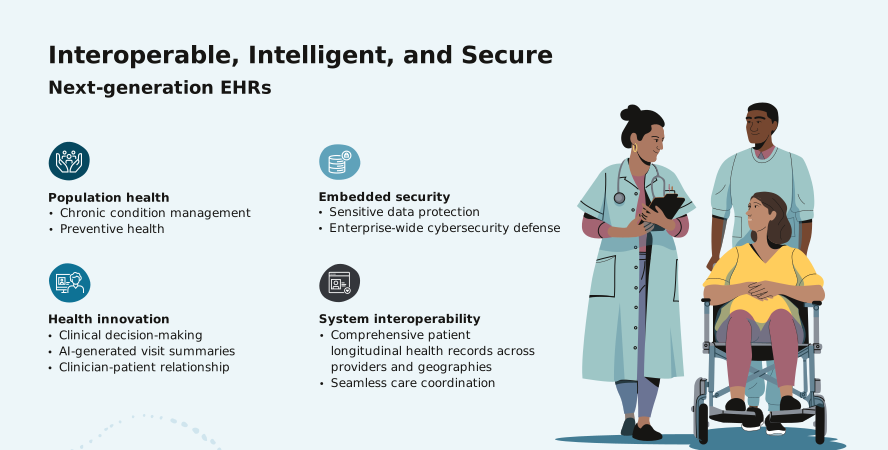
Next-generation EHRs will benefit from advances in AI technology, evolving interoperability standards, and new ways for providers to communicate with digital systems, such as chatbots and voice commands. For example, AI functionality can leverage ambient listening to “listen in” on patient visits and summarize critical points for inclusion in the patient record. New interoperability standards, such as HL7 FHIR (Fast Healthcare Interoperability Resources) and the Trusted Exchange Framework and Common Agreement (TEFCA) in the US, will give providers access to a broader network of patient data currently located in disparate health records to help them optimize care coordination. Enhanced voice/chat user interfaces will simplify note-taking, helping clinicians shift their focus to their patients during visits, search patient records to highlight key concerns, and speed up documentation. Rather than simply using EHRs to order tests and medications, manually code diagnoses, and input scanned documents, clinicians will be able to use the systems to foster collaboration, develop personalized treatment plans based on near real-time data, automate manual workflows, and gain insight into how patients’ lifestyles and living standards may inform their care.
Key Takeaways
- EHRs can help healthcare providers streamline clinical workflows, support patient care, and lower operational costs by refocusing staff on more value-added activities.
- The ability to gain value from EHRs has been frustrated by siloed systems, difficult-to-access clinical notes, and nonintuitive interfaces.
- Next-generation EHRs will incorporate AI to provide clinicians with summaries of patients’ charts and lab results and filter and highlight crucial information.
EHR Explained
Although healthcare professionals are already familiar with EHRs, there’s still a lack of understanding about what they’ll be able to do. At the most basic level, physicians use EHRs to order tests and prescriptions and code diagnoses for insurance and billing purposes. But next-generation EHRs are being designed to help advance care team collaboration, personalize treatment plans, and uncover how patients’ lifestyles may inform their care. They’ll also make it easy for clinicians to input, access, and analyze EHR data via text requests or even voice commands and then exchange data with laboratories, payers, medical researchers, and others.
Imagine a clinician being able to ask for the top health concerns for a patient while walking to an exam room. And once there, with the patient’s permission, being able to direct the EHR’s ambient listening capabilities to summarize the visit for review so they can approve its addition to the patient’s record. Physicians will be able to analyze a patient’s symptoms and health factors against clinical knowledgebases, such as those for cancer or pharmaceutical interactions, and use decision-support tools to generate personalized treatment plans for review and approval. All these capabilities will leverage AI, which will automate administrative tasks such as prior authorizations and claims review.
Evolving interoperability standards and the use of cloud computing are crucial to this expansion of EHR capabilities. Vendor-neutral platforms, such as the CommonWell Health Alliance platform, encompass thousands of provider sites and millions of patients, giving providers access to comprehensive patient data. EHRs delivered through the cloud rather than an on-premises solution will be broadly accessible and enable healthcare providers to scale easily. Cloud-based EHRs also have the robust data security provided by their vendors.
New EHRs are also designed to integrate with patient portals to help patients access their own information and receive alerts, which can, for example, help motivate them to continue to take their medications, make follow-up appointments, and manage their overall health and well-being.
EHR vs. PHR
PHRs, or personal health records, let patients digitally track their own health data and history. EHRs also contain a patient’s historical medical data, but they’re maintained by the patient’s healthcare provider and can be shared across multiple clinical locations.
EHR vs. EMR
The earliest digital medical records were electronic medical records, or EMRs, which essentially digitized the paper medical charts of a single health provider. Although some physician’s offices still use EMRs, most practices and hospitals use certified EHR systems, which can do everything an EMR can do and also share information with other EHRs across healthcare providers.
Benefits of EHRs
EHR innovations are helping clinicians streamline routine tasks and deliver informed patient care. Read on for more on these and other benefits.
- Enhanced patient care and safety. EHRs, especially those with AI capabilities, are designed to help clinicians enhance diagnoses and treatments, supporting optimal care.
- Streamlined workflows and enhanced efficiencies. New EHR capabilities help clinicians streamline a range of workflows, including updating and accessing patient data and reviewing charts.
- Optimized coordination among providers. EHRs provide clinicians across organizations and departments with access to a comprehensive view of a patient’s medical history, prescribed medications, and lifestyle data, helping them coordinate care.
- Limited paperwork and administrative costs. Alleviating the administrative burden of patient care is a big priority. EHRs can automate patient recordkeeping, referrals, prescriptions, and other previously paper-based processes and limit their associated costs.
- Enhanced data security and privacy. In 2024 the US Department of Health and Human Services' Office for Civil Rights tracked 831 major health data breaches affecting more than 182.4 million people. Modern, cloud-based EHRs are helping safeguard against such incidents, with capabilities that include end user tracking, audit investigations, event or threshold alerts, and the detection of anomalous behavior patterns between patients and clinicians.
- Easy access to patient health history. Electronic patient health records are easy to access, search, and update compared to paper records, enabling clinicians to access and update a patient’s health history anytime, anywhere.
- Enhanced accuracy and limited errors in documentation. Digital patient records are entered into the EHR through ambient listening during the course of a provider-patient visit, limiting the opportunity for errors resulting from transcription or difficult-to-read handwriting.
- Support for regulatory compliance and reporting. US regulations require providers to limit access to patient records to safeguard sensitive data. They also call for the creation of audit logs to show that providers are complying with these laws, and they require EHR developers to include in their solutions the ability to export a patient’s entire health record so providers can’t block patients from viewing their own information. In the EU, the GDPR requires EHR developers to build in strong security measures and facilitate the implementation of data retention policies so only necessary data is collected and retained. EHRs can support providers in meeting these requirements by maintaining strong access control processes, encrypting patient data, and performing real-time threat detection.
- Support for data-driven decision-making and research. EHRs can gather relevant information from multiple sources, including drug databases, clinical guidelines, community health repositories, and clinical trial systems, to support research and decision-making.
Types of EHR Implementations
Providers have two options for their EHR implementation: the conventional on-premises model or more recent cloud-based solutions.
- On-premises. Such EHR software runs on computer hardware and networks owned and maintained by the practices or hospitals themselves, is paid for up front in the form of a software license, and is subject to annual maintenance fees.
- Cloud. Cloud-based EHR services, delivered over the internet, relieve practices and hospitals from having to invest in the underlying server, storage, and networking infrastructure, and they can easily be scaled up or down based on need. EHR SaaS offerings are also frequently updated with new features, including emerging AI capabilities. Cloud-based EHRs typically carry a lower total cost of ownership than on-premises systems given the reduced need for IT capital, facilities, and support staff.
EHR Deployment Challenges
EHR deployments can be complex and challenging projects with major operational and financial impacts. Without meticulous planning and a strong focus on helping users become comfortable with the solution, healthcare providers may face cost overruns, difficulties with migrating data, and user resistance to change. Consider the following factors when heading into a deployment:
- Implementation costs. Costs associated with an EHR include implementation expenses, including training, as well as software licensing, hardware, and IT staff costs for on-premises systems or per-user fees for cloud-based systems. Although these costs can be high, surveys of healthcare providers that have implemented new EHRs show savings in several areas, including administration, documentation, transcription, and printing costs.
- Training and user adoption. Encouraging adoption of an EHR requires training programs that take into account clinicians’ time constraints, engage trainees, and are customized for specific roles. In addition, providers need to continually measure clinician satisfaction with the quality of training and degree of comfort in using the EHR.
- Data migration and integration. Migrating data from a legacy EHR to a new EHR can be difficult. EHRs built on open standards ease the task of data migration and limit operational disruption.
- System interoperability. The earliest electronic records were siloed and confined to a single practice or facility, making it difficult to get a complete, accurate, and up-to-date view of a patient’s history. Creating EHRs that are patient-centric, meaning that all data related to a patient is unified into a single view, rather than provider-centric is one of the biggest challenges in healthcare.
- Change management. A number of factors can contribute to clinicians’ resistance to using a newly deployed EHR, including nonintuitive user interfaces, complex navigation structures, colleagues’ negative opinions, and lack of organizational support. Fortunately, advances in EHR technology, including voice and chatbot interfaces and GenAI summaries of patient charts, are designed to optimize the experiences of clinicians and patients alike.
- Privacy and security. A recent report by the Deloitte US Center for Health Solutions found that enhancing cybersecurity is a crucial focus for 78% of the healthcare executives it surveyed. Data stored in cloud-based EHRs is generally considered more secure than data in on-premises systems given the considerable investments cloud providers make in encryption, access controls, user authentication, and other features. Most cloud vendors update their systems with the latest security patches automatically.
- Transition downtime. Any unplanned EHR downtime during the transition to a new system can jeopardize patient safety, lead to lost revenue, and increase labor costs due to the additional overtime pay and staff time required to update records that were offline. Organizations can mitigate this risk by testing upgrades in a simulated environment and choosing low-impact times to complete live upgrades.
- Maintenance and ongoing support. Particularly with on-premises EHRs, ongoing costs for maintenance and support can strain providers’ budgets. Organizations embarking on any kind of EHR implementation need to plan for both initial and ongoing costs and resource requirements, including those for training and compiling user feedback.
- Compliance. Healthcare regulations change frequently, and that creates high stakes for healthcare enterprises. Healthcare providers need an EHR system that can stay on top of compliance and regulation changes. Choosing a vendor that participates in compliance and audit programs can help providers stay up to date. Another area of rapid evolution is industry standards, particularly around interoperability. Using an EHR that is open and interoperable enables providers to connect and integrate disparate systems and move data seamlessly from system to system.
Components of an EHR
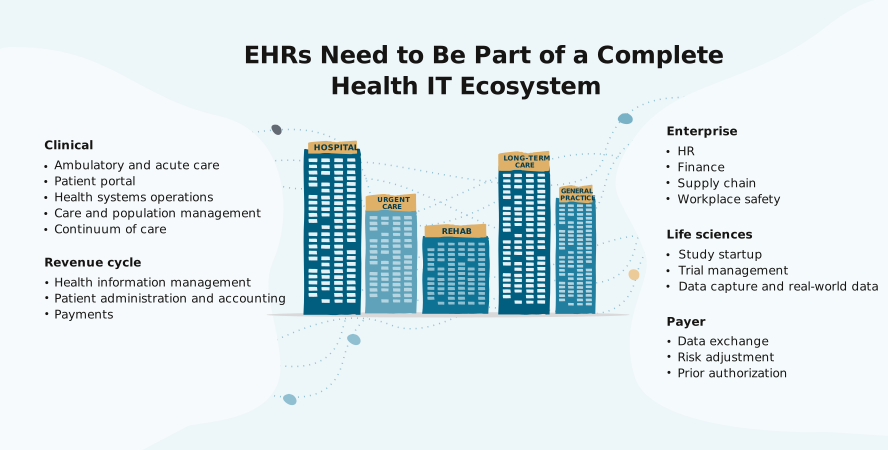
EHRs aren’t just repositories of a patient’s medical data. They’re also part of a health IT ecosystem that includes a number of components that help with clinical decision-making, reporting, and a variety of other important workflows and functions, including the following:
- Care coordination and management. By connecting every member of a care team, EHRs can help them collaborate and coordinate care. That includes coordinating transitions to the next stage of care, whether that’s moving a patient to a rehab facility, making a referral to an outside specialist, or managing chronic conditions through better patient monitoring.
- Patient documentation and data storage. The storage component of an EHR is responsible for securely holding sensitive patient data, including provider notes, visit summaries, treatment plans, and medication lists noting dosage and frequency.
- Clinical decision support tools. Clinical decision support tools provide a single view of a patient’s health history and treatments, supported by data pulled in from medical literature, evidence-based treatment guidelines, and other peer-reviewed sources. They’re designed to help physicians improve their diagnosis and treatment of patients.
- Electronic prescribing (e-prescribing) and order entry. Electronic prescribing capabilities built into EHRs let physicians prescribe medications and automatically receive notifications if one or more of them conflicts with another medication the patient is taking. Click-to-sign functionality speeds up approvals while maintaining a record of the signer’s credentials. Providers can enter other types of medical orders, including lab visits and imaging requests, using the EHR to check orders against the patient’s history and receive alerts about allergies or duplicate orders.
- Appointment scheduling and management. EHRs can integrate with patient administration and portal software to provide a central inbox that receives status notifications about missed appointments and unfilled prescriptions so care teams can quickly intervene. The center can also display status updates when a patient has completed a referral visit.
- Lab and diagnostic result integration. EHRs can store and give clinicians access to lab results, such as blood tests, and diagnostic images, such as X-rays, MRIs, and ultrasounds, helping them provide diagnoses and treatment recommendations faster.
- Billing and coding modules. EHRs help improve the speed and accuracy of coding and billing by automating data entry and treatment code selection. They also connect to revenue cycle management solutions, providing visibility into the entire claims process.
- Reporting and analytics tools. Such tools aggregate and analyze data from clinical, financial, operational, and nontraditional sources (such as wearable medical devices and even social media) to support health diagnoses and insights.
- Security and privacy features. EHRs use continuous monitoring to detect unusual activity and uncover potential security violations and threats. Access controls support IT efforts aimed at allowing only authorized users to see sensitive data. Data encryption provides another layer of protection.
- Interoperability with other systems. The ability of EHRs to connect with other systems and share data is called interoperability. Interoperability features in the latest EHRs automate the exchange of information in a secure and accessible manner—for example, by enabling physicians to send prescriptions directly to a pharmacy’s management system or automating the extraction and sharing of clinical information between providers and payers.
9 Key Functions of EHRs
EHRs are designed to manage the entire clinical workflow by automating processes, delivering point-of-care insights, simplifying patient intake, documentation, and clinical follow-up, and supporting regulatory compliance. Read on for more on these and other functions.
- Storing and managing patient health data. EHRs store and manage patient medication, health history, and other data collected over time to give physicians the context they need to identify optimal treatments. Public health officials use anonymized patient data to track incidents of disease and illness, while researchers use it to develop clinical trial protocols and identify trial participants.
- Facilitating electronic prescriptions. EHRs’ electronic order entry capabilities can make it easier to order prescriptions and tests while reducing errors and flagging potentially dangerous drug interactions.
- Scheduling and managing appointments. EHRs can integrate with software that helps schedule and manage appointments, thus helping free up desk staff to focus on higher-level work. They can also help physicians organize their day by providing a view of upcoming appointments, each patient’s reason for visiting, and a summary of their health information.
- Tracking patient progress and medical history. EHRs gather a complete, longitudinal record of a patient’s medical history, including diagnoses, treatments, surgeries, medications, and lifestyle indicators, giving physicians context for future diagnoses and treatments. These records help providers capture the details of clinical encounters accurately and efficiently through voice dictation and standardized templates that can be customized for specialty workflows.
- Enabling clinical decision support. The latest EHRs can provide the right data at the right time to enhance clinical decision-making. This enhanced decision support is enabled partly through the introduction of new types of user interfaces—voice, text, and guided workflows—that allow physicians to access comprehensive patient and third-party diagnostic data, such as clinical trial results, drug catalogs, and government health data.
- Enabling lab appointment authorizations and communicating results. EHRs can use information obtained during a patient’s visit to propose relevant lab tests for the physician to approve, send the requests to the appropriate labs, and then summarize the lab results and update the patient’s record.
- Supporting billing and coding. A provider’s finance team can extract relevant information from a patient’s record and route it to billing and revenue management to automate coding and speed up payer reimbursement. Streamlined workflows are less likely to result in coding errors that can cause claim refusals.
- Enhancing communication between providers. EHRs use open data schemas that define the structure of a data set and industry standards to share data, regardless of its physical location. Providers can enable third parties that they’ve identified as trusted sources, such as immunization registries and other care venues, to connect to their EHR and write directly into the patient’s record. Referral management capabilities connect providers with specialists and make it easy for clinicians to track patient referrals and whether appointments are made promptly.
- Supporting regulatory compliance and reporting. Certified EHR technology enables data to be stored in a structured format so providers can more easily manage it securely. Access to this data can help physicians measure care quality and identify care gaps across populations.
Find out how to transform your EHR into a smart, AI-powered healthcare assistant with Oracle Health EHR.
EHR Best Practices
Gaining stakeholder buy-in, locking in strong security technology and practices to help fend off cyberattacks, and prioritizing interoperable EHRs are just a few of the ways providers can get the most out of their new or upgraded EHR. Read on to learn about these and other recommended practices.
- Involving stakeholders in planning and implementation. Senior management and project leaders need to communicate why their provider is investing in a new EHR and how users and the enterprise are expected to benefit. The American Medical Association recommends frequent communication at every stage, using multiple channels including emails, companywide video calls, and smaller group meetings.
- Providing comprehensive staff training. Consistent and comprehensive EHR training is essential to fostering strong adoption and high-quality user experiences. Classroom instruction is still a necessary component, but providers should also consider using online modules embedded within the EHR, offline training environments where users can train on common tasks, and occasional refresher courses.
- Emphasizing data security and privacy. Data security and privacy are a top priority for providers given the considerable financial and reputational damages caused by healthcare system breaches. User training on phishing and other scams, strong passwords, strict access controls, and data encryption are essential. Cloud-based EHRs are considered to be more secure than on-premises ones because they’re regularly updated with the latest security patches.
- Regularly updating and maintaining the EHR. Cloud-based EHR systems are easier to update and maintain than on-premises systems, as cloud providers deliver the latest fixes and new features on a regular, often quarterly basis—sooner in the case of security patches.
- Enabling EHR interoperability. EHRs that are interoperable—not only across departments and facilities but also with the systems of other providers, researchers, pharmacies, labs, and data aggregators—are essential to creating a comprehensive record to inform a patient’s care.
- Avoiding EHR customizations. Older, on-premises EHR systems were often highly customized, making them difficult to upgrade, integrate with other systems, and secure. Vendors of new cloud-based EHRs, with their built-in industry best practices, encourage providers to avoid customizations.
- Continually monitoring and enhancing performance. Ongoing system performance improvements are easier with a cloud-based EHR. Continual monitoring is crucial given growing cyberattack threats—this enables cloud health technology vendors to apply fixes as they’re needed, although EHR updates will likely require action from the provider to facilitate the safeguarding of patient data.
- Prioritizing user-friendly interfaces. EHRs with intuitive navigation and voice- or chat-based user interfaces provide the best experience for clinicians and other staff.
Choosing the Right EHR
Choosing the right EHR is an organizationwide project. The team tasked with making a buying recommendation should include clinical (physicians, nurses, aides), finance, procurement, and IT staff, as well as one or more executive sponsors. The team should identify goals for the new EHR and potential vendors, then create a request for information. Bring in the top vendor candidates for in-person presentations and demos. Check customer references, both those provided by the vendor and those obtained from trade organizations and colleagues working at other providers. Consider bringing in specialist consultants not tied to a specific vendor. When it comes time to negotiate a contract with the first-choice vendor, keep a backup in mind in case those negotiations break down.
EHR Implementation
An important action a healthcare provider can take during the planning stages of an EHR implementation is to set up a transition team. This team will include many of the same people on the selection team, with individuals from the C-suite, clinical and business operations, and IT, as well as participants from the vendor’s business and technical staff.
The first step for this team is to obtain a clear picture of the current state of their EHR, uncover inefficiencies, and identify improvement opportunities that can be met with the new EHR. Next they’ll need to communicate with all users to ensure they know why the transition is necessary and then get their feedback and buy-in. This isn’t a one-time task—ongoing communication before, during, and after implementation can help staff use the new EHR efficiently and stay positive about the change. For example, providers can use biweekly or monthly pulse surveys to measure user sentiment and get early insights into potential obstacles.
The provider needs to decide whether to take a big bang or a phased approach to the implementation. Although big bang implementations can be riskier, managing a phased, department-by-department, issue-by-issue rollout can be cumbersome, while a big bang approach enables providers to hit the ground running after the system goes live.
During go-live, the people most closely affected will require support and end users will need ready access to at-the-elbow support. After go-live, providers should gather feedback from users and support ongoing optimization efforts.
Enhance Healthcare with Oracle Health EHR
Oracle Health EHR* supports every step of the clinical experience, from patient referrals through care and follow-ups. During an appointment, clinicians receive contextually relevant information about the patient, helping them provide diagnoses and patient care recommendations faster. Additionally, the ability to collaborate across care teams helps clinicians provide the right care at the right time. Oracle Health EHR will use ambient listening to “listen in” on conversations, recognize relevant information, and generate draft notes for physician approval. With voice-driven and conversational language search, the EHR is designed to help clinicians access a unified patient data summary along with clinical knowledgebases to make informed care decisions.
EHR FAQs
What is the difference between ERP and EHR?
EHR systems help manage patient data, while ERP systems handle broader business operations such as finance and project management. It’s helpful to have an EHR system that can integrate with ERP systems.
Can the abbreviations EHR and EMR be used interchangeably?
No. An EHR allows healthcare providers to share and coordinate patient data across a multitude of care providers and other organizations. An EMR is typically a standalone system in a hospital group or physician’s practice.
* The content is intended to outline Oracle’s general product direction. It is intended for information purposes only and may not be incorporated into any contract. It is not a commitment to deliver any material, code, or functionality, and it should not be relied upon in making purchasing decisions. The development, release, timing, and pricing of any features or functionality described for Oracle’s products may change and remain at the sole discretion of Oracle Corporation.